Trade 300+ ETFs
on NSE & BSE

From global, metals, Nifty 50 to liquid ETFs – every major ETF category, live on exchange. Real-time prices, full market depth, and ₹10 flat brokerage.

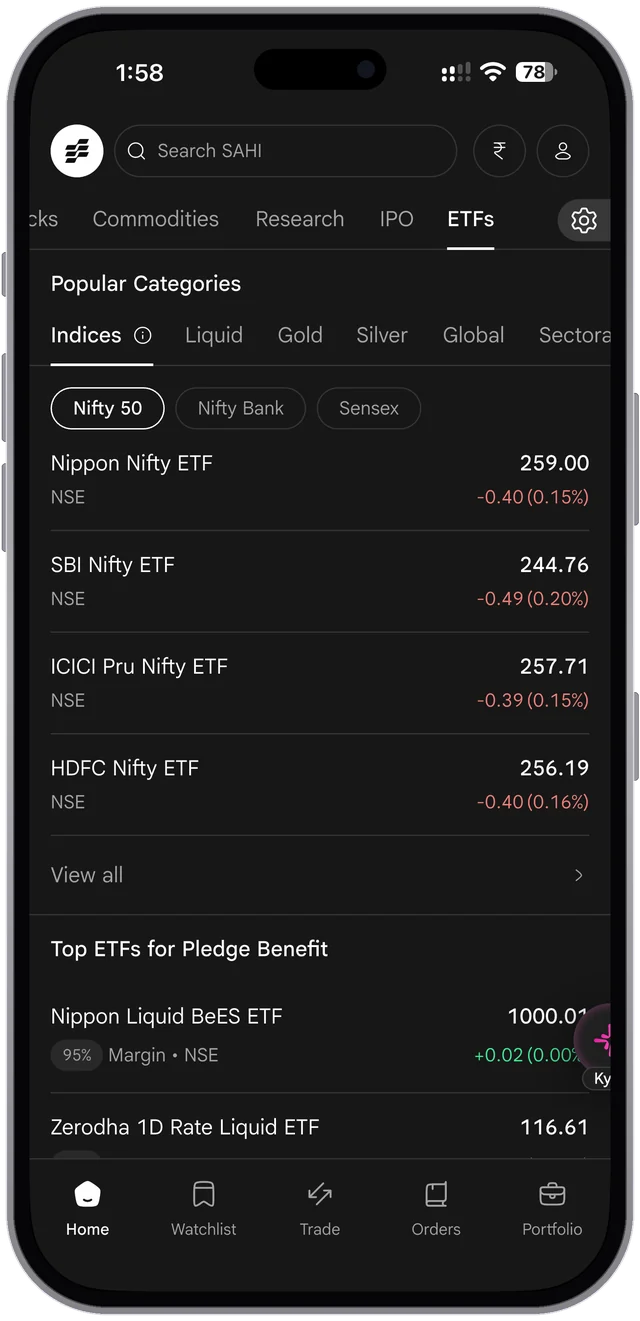
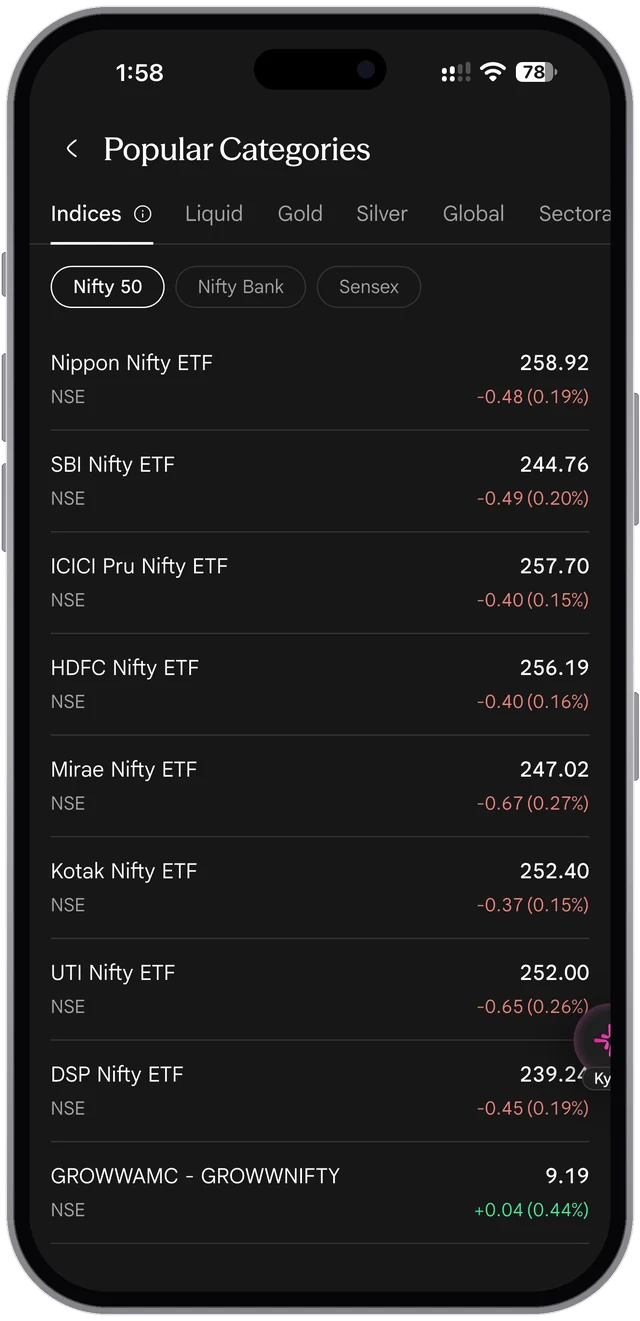
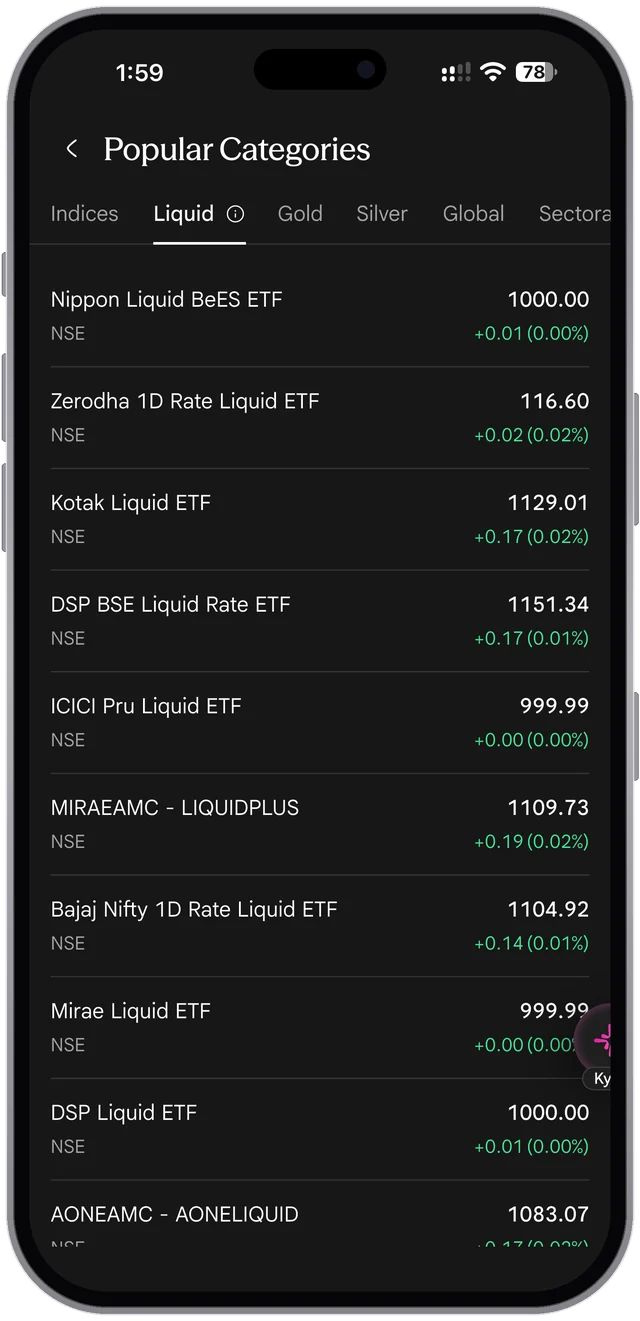
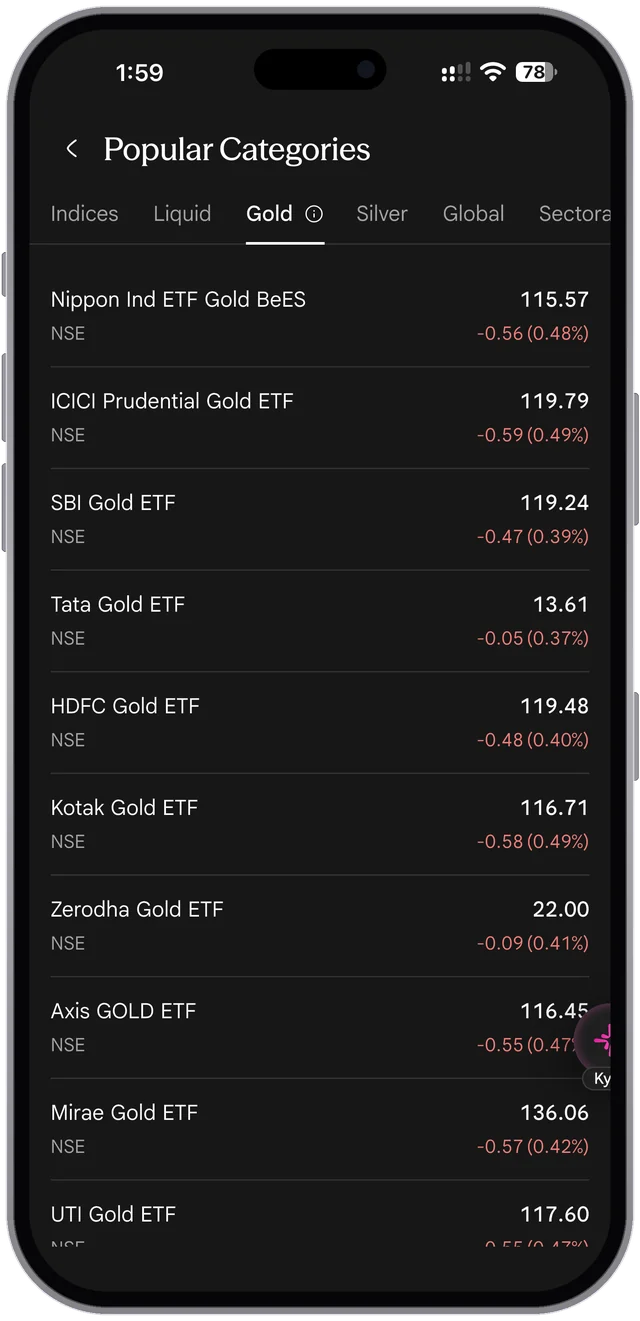
The SAHI app. ETFs tab: popular categories (indices, liquid, gold, silver, global, sectoral) and the top ETFs for pledge benefit with their margin The SAHI app. Popular Categories, Indices: Nifty 50 ETFs from each fund house with price and change

Find Your ETF

Popular Categories, Indices: Nifty 50 ETFs from each fund house with price and change

Sample screens from the SAHI app. The prices in them are not live.

Why choose SAHI for ETF trading

Everything you need. Nothing you don't.

ETFs tab: popular categories (indices, liquid, gold, silver, global, sectoral) and the top ETFs for pledge benefit with their margin

Make your capital work twice

Free margin from liquid ETFs you already own. Pledge liquid ETFs for F&O margin collateral.

  • Pledge liquid ETFs
    like Nippon Liquid BeES, ICICI Pru Liquid, and Mirae Liquid ETF for F&O margin.
  • 60+ eligible ETFs
    See your margin percentage upfront, before you trade on SAHI.
  • Instant margin available
    Available right after you pledge.

FAQs

What is an ETF and how does it work?

An ETF, or Exchange Traded Fund, is a fund that holds a basket of securities, or gold or silver, and trades on the exchange like a single share. Its price moves through the day with the market, and most ETFs track an index at a low cost. You buy and sell it through a demat account.

Do I need a demat account to invest in ETFs?

Yes. Because ETFs trade on the exchange like shares, you need a demat and trading account to buy and hold them. This differs from index mutual funds, which you can buy without a demat account. SAHI lets you open an account and trade 300+ ETFs across NSE and BSE.

What is the difference between an ETF and a mutual fund?

An ETF trades on the exchange in real time at market price and needs a demat account, while a mutual fund is bought and sold once a day at NAV. ETFs usually carry lower expense ratios, and mutual funds allow easy SIPs without a demat account. Both offer diversification across many holdings.

How do I buy an ETF in India?

Open a demat and trading account, search for the ETF by name or symbol, and place a buy order as you would for a stock. Watch the bid-ask spread and buy near fair value. SAHI shows full market depth with five bid and ask levels, plus charts, so you can time the order.

Can I buy and sell ETFs anytime like stocks?

Yes. ETFs can be bought and sold throughout market hours at live prices, unlike mutual funds, which transact once a day at NAV. This gives ETFs intraday flexibility. Checking full market depth helps you trade close to the fund's fair value.

Can I pledge ETFs to get margin for trading?

Yes. Liquid and other eligible ETFs can be pledged as collateral to get margin for derivatives, with margin usually available soon after pledging. SAHI supports pledging 60+ eligible ETFs, subject to the cash-collateral rules. The ETFs tab lists the top ETFs for pledge benefit with the margin each one gives, such as 95% for Nippon India Liquid BeES.

How are ETFs taxed in India?

Equity ETFs are taxed like shares: gains on units held up to a year are taxed at 20%, and longer-held gains above ₹1.25 lakh in a financial year at 12.5%. Gold and silver ETFs held more than a year are taxed at 12.5%, and at your slab rate if sold sooner. Debt ETFs are taxed at your slab rate however long you hold them. These are the rates from 23 July 2024. This is general information, not tax advice.

What is a liquid ETF?

A liquid ETF invests in very short-term, low-risk instruments and is used to park idle cash in your demat account while earning a small return. Traders often hold liquid ETFs and pledge them as margin collateral. SAHI lists liquid ETFs among its 300+ ETFs across categories.

High performance trading
at unmatched value

Pay only ₹10 per executed order and save 50% more than other platforms.

  • Account opening: ₹0

  • AMC charges: ₹0

  • Brokerage charges per order: ₹10

Zero brokerage for your first 30 days after your account is ready to trade, then ₹10 per executed order. Statutory charges such as STT and exchange fees still apply.

Explore Now
vs sahi.com

This page against sahi.com

ETFs

Checked 27 October 2026 · 4 missing · 16 bad · 6 changed

Missing on sahi.com 4

  1. MediumContentDesktop and phoneetf-12

    The page never explains the "30 Days Free" in its own title

    The page title, shown in search results and on the browser tab, reads "ETF Investing at ₹10/Order — 30 Days Free", but nothing on the page mentions a free period: the hero says "₹10 flat brokerage" and the price section "Pay only ₹10 per executed order". sahi.com's Pricing page says brokerage is zero for the first 30 days after an account is ready to trade, ETFs included.

    Our copy: A line under the price tiles says, in the Pricing page's words: zero brokerage for the first 30 days after the account is ready to trade, then ₹10 per executed order, with statutory charges such as STT and exchange fees still payable.

  2. MediumContentDesktop and phoneetf-20

    The tax answer gives no rates

    "How are ETFs taxed in India?" says gains are taxed "at the applicable STCG rate" and "at the LTCG rate", that gold, silver and debt ETFs "follow non-equity rules", and that readers should "verify the current rules". It gives no rate and no holding period.

    Our copy: The answer gives the rates from 23 July 2024: equity ETFs 20% within a year and 12.5% above ₹1.25 lakh after; gold and silver ETFs 12.5% after a year and slab rate before; debt ETFs at slab rate whatever the holding period.

    sahi.com
    sahi.com: The tax answer gives no rates
    Our copy
    Our copy: The tax answer gives no rates
  3. LowContentDesktop and phoneetf-13

    The app pictures quote ETF prices with no note that they are samples

    The same fund appears at four prices on one page: Nippon Nifty ETF is 266.53 in the desktop hero, 273.60 in Find Your ETF, 275.83 on the chart and 275.84 on the order ticket. None is dated or marked as a sample, so a reader may take them for current prices.

    Our copy: A line under the Find Your ETF phone says the screens are samples from the SAHI app and the prices in them are not live.

    sahi.com
    sahi.com: The app pictures quote ETF prices with no note that they are samples
    Our copy
    Our copy: The app pictures quote ETF prices with no note that they are samples
  4. LowContentDesktop and phoneetf-21

    The pledge answer never says how much margin a pledged ETF gives

    "Can I pledge ETFs to get margin for trading?" says 60+ ETFs can be pledged, but not what margin they give. The app's ETFs tab shows it for each one (95% for Nippon India Liquid BeES in the owner's screenshot of October 2026).

    Our copy: The answer points to the "Top ETFs for Pledge Benefit" list in the ETFs tab and gives that example.

    sahi.com
    sahi.com: The pledge answer never says how much margin a pledged ETF gives
    Our copy
    Our copy: The pledge answer never says how much margin a pledged ETF gives

Broken or poor on sahi.com 16

  1. HighContentDesktop and phoneetf-1

    The price tiles print the wrong prices until the script runs

    The same split-flap tiles as on the IPO page. Checked on 27 October 2026: the server HTML of the price section still reads "₹ 20 20 Account opening ₹ 16 16 AMC charges ₹ 21 21 Brokerage charges per order" (the figures the animation starts from), while the tiles' aria-labels say "rupees 0" and "rupees 10". Without the script, and for search engines and link previews, the page quotes ₹20, ₹16 and ₹21.

    Our copy: The page text holds only the real prices, ₹0, ₹0 and ₹10; the figures the flip starts from are drawn by the style sheet. The flip runs once, only with the script running and motion allowed, and screen readers hear each price with its label.

  2. MediumAccessibilityDesktop and phoneetf-2

    Every ETF category is in the tab order twice

    Find Your ETF has seven category tabs (Indices, Liquid, Gold, Silver, Global, Sectoral, Debt), and the phone picture under them repeats all seven as working buttons. Measured: the seven buttons inside the picture all have tabindex 0, so after the tabs the Tab key walks through Indices, Liquid, Gold… a second time, and a screen reader hears every category twice.

    Our copy: One set of category tabs, moved between with the arrow keys. The row drawn inside the phone is part of the picture: it follows the chosen tab but is skipped by the keyboard and by screen readers.

  3. MediumAccessibilityDesktop and phoneetf-3

    FAQ answers are justified and the questions are forced into Title Case

    Answers are set at 18px with text-align: justify, so in the 316px-wide answer on a 390px phone the lines are stretched with wide gaps between words. Questions are styled with text-transform: capitalize: "What Is An ETF And How Does It Work?", "Can I Buy And Sell ETFs Anytime Like Stocks?".

    Our copy: Answers are left-aligned at 17px with a 1.65 line height; questions read in sentence case as written.

    sahi.com
    sahi.com: FAQ answers are justified and the questions are forced into Title Case
    Our copy
    Our copy: FAQ answers are justified and the questions are forced into Title Case
  4. MediumAccessibilityDesktop and phoneetf-4

    The 2X picture is announced by its file name

    In "Make your capital work twice" the silver 2X on a pedestal has the alt text "Frame 2147234108.png", so a screen reader reads out a design-tool file name.

    Our copy: The picture is decorative (the heading says it all), so it has an empty alt and is skipped.

  5. MediumLayoutPhoneetf-11

    On a phone the price section is taller than the screen

    At 390px the heading "High performance trading at unmatched value" is set at 44px and breaks into four lines (202px), leaving "trading" and "value" alone on their lines, and the three 237 × 266px price tiles stack in one column. From the heading to the Explore Now button it measures 1,215px, about one and a half screens of an 844px phone, to show three prices.

    Our copy: The heading is sized for the phone and reads in two lines, and the three tiles sit side by side at every width: heading, prices, note and button take 530px.

    sahi.com
    sahi.com: On a phone the price section is taller than the screen
    Our copy
    Our copy: On a phone the price section is taller than the screen
  6. MediumContentPhoneetf-23

    In the app, some ETFs sit in the wrong category

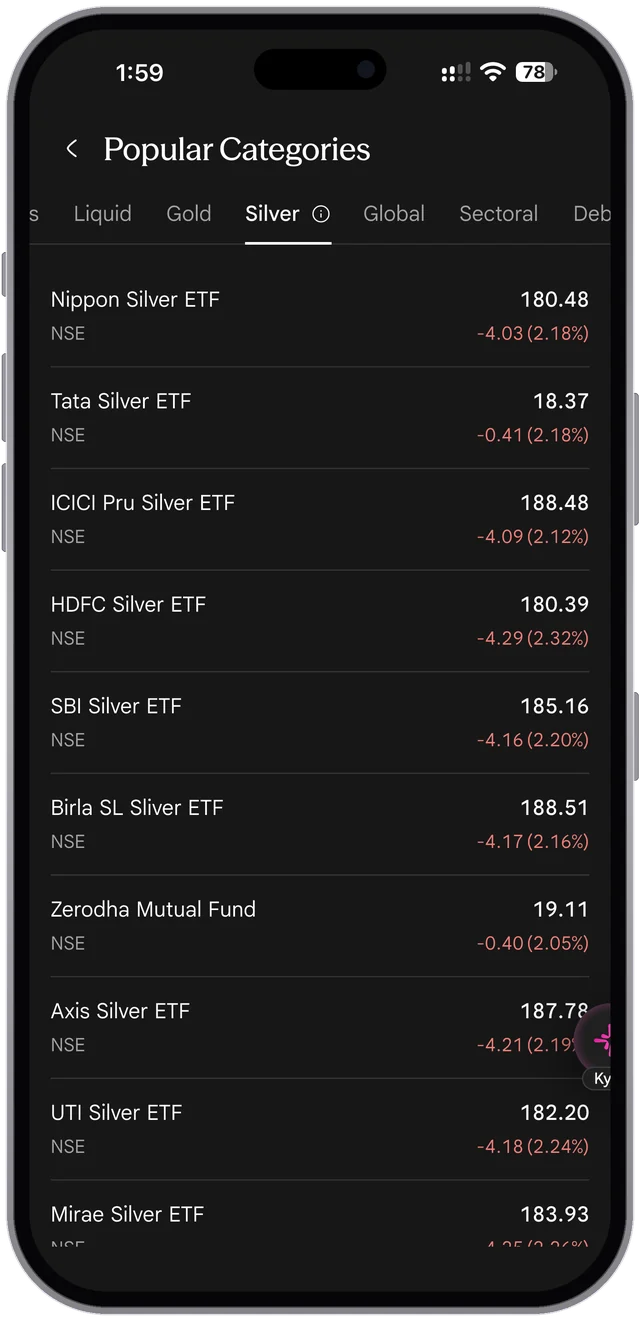
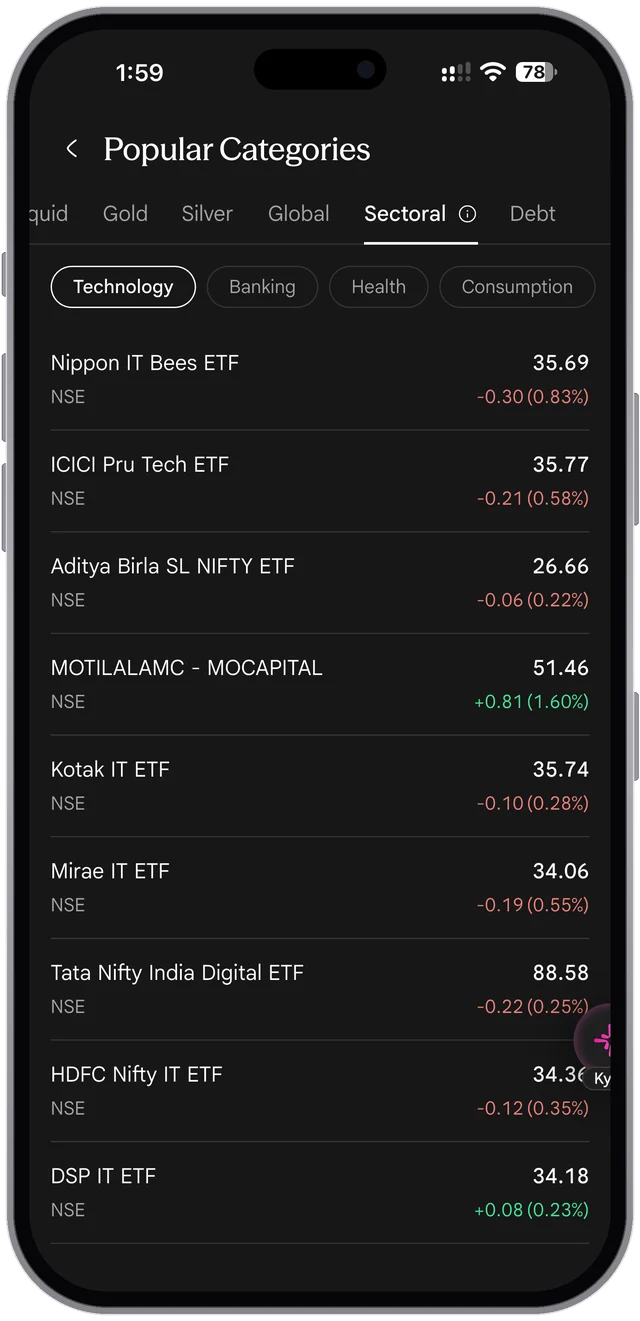
    SAHI app, owner's screenshots of Popular Categories (27 Oct 2026, 1:59 PM): Sectoral → Technology lists "MOTILALAMC - MOCAPITAL", which by its code is a capital-markets fund, and "Aditya Birla SL NIFTY ETF", which by its name tracks the Nifty 50, among the IT ETFs. Global → USA lists "DSP Nifty Top 10 Equal Weight ETF", an Indian index, and "DSP New ETF", whose name says nothing about what it holds. An investor choosing by category can end up in the wrong fund. Needs verification: what each of these four funds tracks.

    Our copy: Not something this site can change: recorded for the app team. Our page shows the category screens as they are.

  7. LowContentDesktop and phoneetf-5

    The hero sentence is missing a comma

    "From global, metals Nifty 50 to liquid BeES - every major ETF category…": a double space stands where the comma after "metals" should be, so it reads as "metals Nifty 50".

    Our copy: "From global, metals, Nifty 50 to liquid BeES – every major ETF category…"

  8. LowContentDesktop and phoneetf-6

    Typo in the pledging answer

    "Can I pledge ETFs to get margin for trading?" ends "subject to the cashcollateral rules".

    Our copy: "subject to the cash-collateral rules".

  9. LowSEODesktop and phoneetf-7

    The search description promises things the page never mentions

    The meta description reads "Zero brokerage on delivery, live NAV, and one-click SIP setup." The page itself says "₹10 flat brokerage" and never mentions NAV or SIPs, so the search result and the page disagree on price.

    Our copy: The description is written from the page's own words: 300+ ETFs on NSE and BSE, real-time prices, full market depth, ₹10 flat brokerage and pledging liquid ETFs for F&O margin.

  10. LowVisualDesktop and phoneetf-8

    The phone in Find Your ETF is cut off with a hard edge

    The app screen ends in a hard straight edge: at 1440px it cuts through a row of the list ("GROWWAMC - GROWWNIFTY" sliced in half), and on a phone it stops abruptly just under the ICICI Pru Nifty ETF row, so it looks as if the section ended early rather than on purpose.

    Our copy: The phone fades out under the list over a faint floor grid, as on sahi.com.

    sahi.com
    sahi.com: The phone in Find Your ETF is cut off with a hard edge
    Our copy
    Our copy: The phone in Find Your ETF is cut off with a hard edge
  11. LowLayoutPhoneetf-9

    Category chips run off the edge with no sign that more follow

    On a 390px phone the row shows Indices, Liquid, Gold and part of "Silver"; the Debt chip starts at 712px, so Global, Sectoral and Debt can only be reached by swiping, and nothing says so.

    Our copy: The row fades at its edge and has an arrow button that scrolls it on; on wider screens all seven chips sit centred in one row.

    sahi.com
    sahi.com: Category chips run off the edge with no sign that more follow
    Our copy
    Our copy: Category chips run off the edge with no sign that more follow
  12. LowVisualDesktop and phoneetf-14

    The market depth and live snapshot pictures show faded slices of other screens

    The Full Market Depth picture has a faded strip of the chart toolbar (Range, Interval, Indicators) above the table and a faded "Live snapshot" bar below it; the Live Snapshot picture opens with the faded totals of the depth table (11,17,936 and 13,60,787), and its bottom fifth is empty. On a phone the stray "Live snapshot" bar sits directly above the "Full Market Depth" heading.

    Our copy: The Full Market Depth card shows a real app screen instead (etf-18). The live snapshot picture is masked to its own card in both themes, and on a phone it is cropped to the card.

    sahi.com
    sahi.com: The market depth and live snapshot pictures show faded slices of other screens
    Our copy
    Our copy: The market depth and live snapshot pictures show faded slices of other screens
  13. LowContentDesktop and phoneetf-22

    "Liquid BeES" is named as a category, and an ETF is called "a basket of … an index"

    The hero says "From global, metals, Nifty 50 to liquid BeES", but Liquid BeES is one fund's name, not a category. The first FAQ calls an ETF "a basket of securities such as an index, gold, or a sector", which reads as if an index were a security. The chart card uses a hyphen as a dash ("drawing tools - the same experience").

    Our copy: "…to liquid ETFs"; an ETF is "a fund that holds a basket of securities, or gold or silver"; the dash is a comma.

    sahi.com
    sahi.com: "Liquid BeES" is named as a category, and an ETF is called "a basket of … an index"
    Our copy
    Our copy: "Liquid BeES" is named as a category, and an ETF is called "a basket of … an index"
  14. LowContentPhoneetf-24

    In the app, ETF names are misspelt or replaced by codes

    SAHI app, owner's screenshots of Popular Categories (27 Oct 2026): Silver lists "Birla SL Sliver ETF". Two different funds are called just "Zerodha Mutual Fund" (one under Silver at 19.11, one under Debt at 29.67), and others show the exchange code in place of a name: "MOTILALAMC - MOCAPITAL", "MIRAEAMC - LIQUIDPLUS", "AONEAMC - AONELIQUID", "GROWWAMC - GROWWNIFTY". The rest are written in four styles ("Motilal Nasdaq Q 50 ETF" beside "Motilal OS Nasdaq 100 ETF", "Axis GOLD ETF" beside "Kotak Gold ETF"). Needs verification: the scheme names of the two Zerodha funds.

    Our copy: Not something this site can change: recorded for the app team. Show each ETF's scheme name, spelt one way.

  15. LowContentPhoneetf-25

    In the app, a delivery ETF buy shows "Req margin"

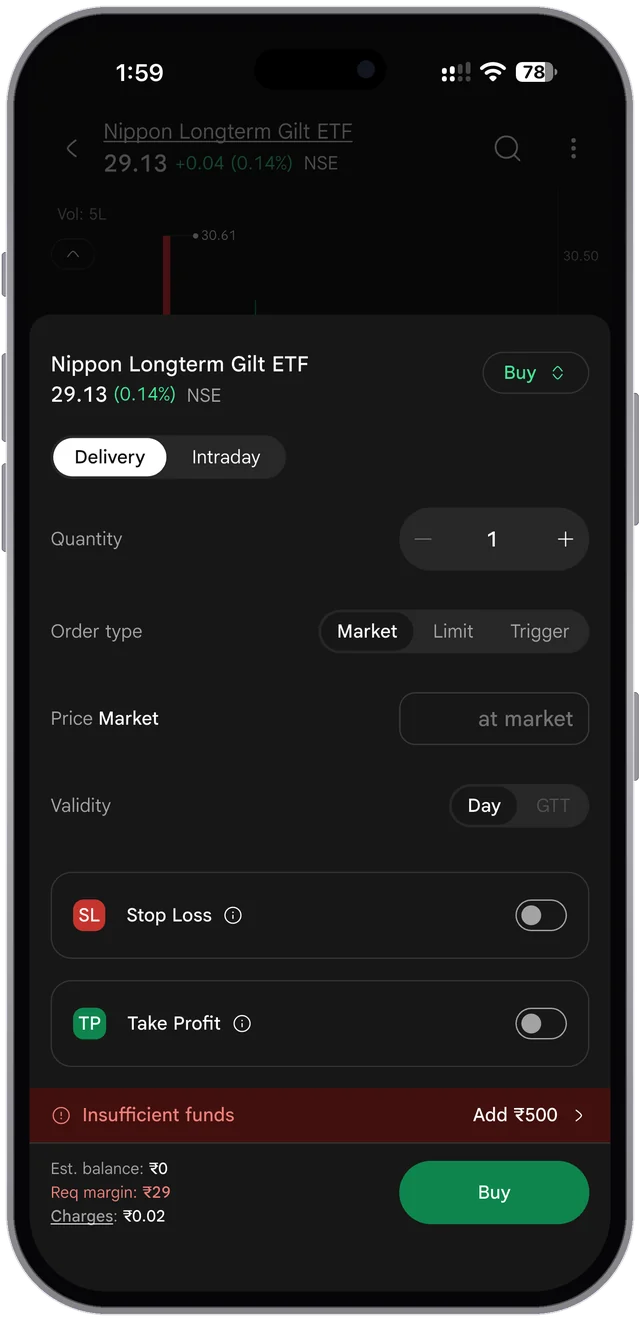
    SAHI app, owner's screenshot (27 Oct 2026): a Delivery market buy of one Nippon Longterm Gilt ETF unit at 29.13 shows "Req margin: ₹29". A delivery buy of a stock on the same screen shows "Amount: ₹2,528". A delivery purchase needs the full amount, not a margin, so the ETF label is wrong.

    Our copy: Not something this site can change: recorded for the app team.

  16. LowLayoutPhoneetf-26

    In the app, the Kyro button covers ETF prices and the depth table

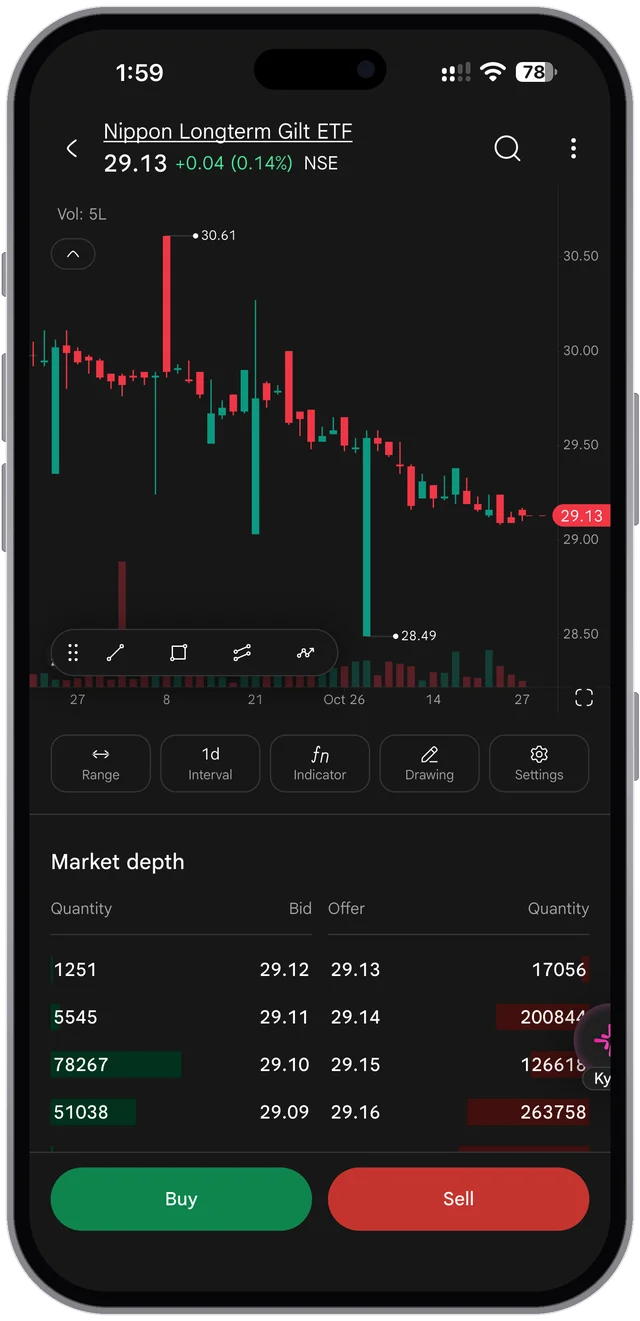
    SAHI app, owner's screenshots (October 2026): the floating Kyro button sits over the right edge of every Popular Categories list and covers the last digits of prices, for example 34.36 (HDFC Nifty IT ETF), 28.69 (LIC MF Nifty 8-13 yr G-Sec ETF) and 187.78 (Axis Silver ETF). In Market depth it covers the offer quantities, and 200844 and 126618 also run into the screen's edge. See options-19 for the same on the F&O screens.

    Our copy: Not something this site can change: recorded for the app team.

Changed here 6

  1. ChangeAnimationDesktop and phoneetf-15

    Choosing a category fades its screen in

    A short fade (0.4 seconds) shows that the phone screen changed with the tab. It does not run when the reader has asked for reduced motion.

  2. ChangeVisualDesktop and phoneetf-16

    Find Your ETF shows the SAHI app's own screen for each category

    The seven tabs switch between the owner's screenshots of the app's Popular Categories list for Indices, Liquid, Gold, Silver, Global, Sectoral and Debt, in place of sahi.com's phone frame with a drawn category row over a list picture. The other tabs' screens are fetched the first time the reader points at, focuses or touches the category row, so the next tab shows its screen at once. The note under the phone still says the screens are samples and their prices are not live.

    sahi.com
    sahi.com: Find Your ETF shows the SAHI app's own screen for each category
    Our copy
    Our copy: Find Your ETF shows the SAHI app's own screen for each category
  3. ChangeVisualDesktop and phoneetf-17

    1-Tap execution shows a real order screen

    The owner's screenshot of buying an ETF (Delivery or Intraday, market, limit or trigger order, Stop Loss and Take Profit) replaces sahi.com's order-ticket picture. It fades out below Take Profit, so the test account's red 'Insufficient funds' bar is never shown.

    sahi.com
    sahi.com: 1-Tap execution shows a real order screen
    Our copy
    Our copy: 1-Tap execution shows a real order screen
  4. ChangeVisualDesktop and phoneetf-18

    Full Market Depth shows a real ETF screen with its depth table

    The owner's screenshot of an ETF's chart with five bid and offer levels and the Buy and Sell buttons replaces sahi.com's depth picture, so the card shows the depth 'right on the ETF screen', as its text says.

  5. ChangeVisualDesktop and phoneetf-19

    The pledge panel adds the app's Top ETFs for Pledge Benefit list

    In front of sahi.com's 2X picture, the owner's screenshot of the ETFs tab is cut to its Top ETFs for Pledge Benefit list, where each liquid ETF shows its margin (95% for Nippon Liquid BeES ETF), as the '60+ eligible ETFs' point describes.

    sahi.com
    sahi.com: The pledge panel adds the app's Top ETFs for Pledge Benefit list
    Our copy
    Our copy: The pledge panel adds the app's Top ETFs for Pledge Benefit list
  6. ChangeVisualDesktop and phoneetf-27

    The hero shows today's ETFs tab

    sahi.com's hero is a photo of a hand holding the older app. Ours shows the current ETFs tab and the Indices list on two upright phones (owner's screenshots, October 2026).

On every page as well: 1 missing · 22 bad · 6 changed (the header, footer, colours and theme). See the every-page list.

Open on sahi.comThe full report