


Intraday leverage, shown before you trade
WhereAny stockBuy or SellIntraday
Intraday buying power is not your balance: it depends on the leverage the stock gets, and that differs from stock to stock. The order form and 1-Tap now show it as a badge on Intraday, from 2X to 5X.
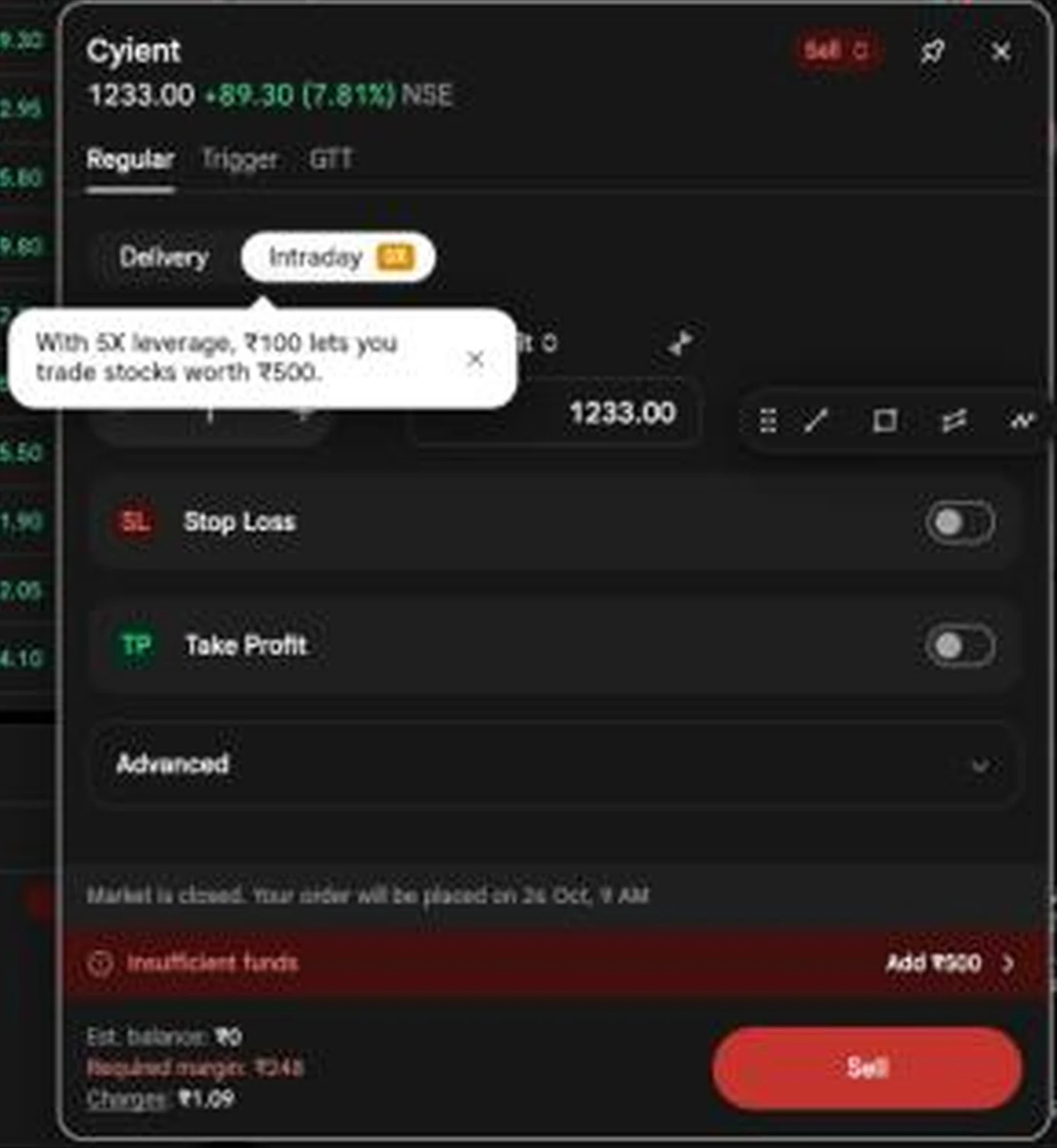
On web, hover the badge for what it means in money. The margin on the button already uses it, so what you see is what the trade will block.
How to use it3 steps
- Open a stock and press Buy or Sell. With 1-Tap off, the order window opens; with 1-Tap on, the 1-Tap panel shows the same badge.
- Pick Intraday. The badge beside it shows the leverage for this stock.
- Read the margin under the button: roughly price × quantity divided by the leverage.
Cyient at 1,233.00 on Intraday 5X: one share asks for a required margin of ₹248, about a fifth of the price. In the app, Moneyview at 60.46 on Intraday 5X shows Margin: ₹12 for one share (60.46 ÷ 5 ≈ 12.09).
Leverage multiplies losses as much as gains. Size your position on what you can afford to lose on the full value, not on the margin.
- Leverage applies to intraday positions; they are squared off the same day.
- The figure differs by stock and can change, so check the badge each time.
The same badge in the app
WhereSAHI appAny stockIntraday
In the app the badge sits on the Intraday switch at the foot of the chart, and both buttons show the margin for the quantity you set.
 Moneyview, Intraday 5X: margin ₹12 for one share
Four Gann drawing tools
WhereAny chartDrawingsGann
Gann analysis treats price and time as one grid. SAHI now has the four tools traders use most, in the Gann group of the drawing list, under the Fibonacci tools. Each is fully customisable and saved with your chart across sessions and devices.

How to use it4 steps
- Open Drawings on any chart and go to the Gann group.
- Pick a tool and click the start point, usually a major swing high or low.
- Click the end point. Gann Box takes two corners; Gann Fan fans out from the first point.
- Select the drawing to change its levels, colours and line width.
Draw from a clear swing point. A Gann tool anchored on a random bar gives random levels.
What each Gann tool draws
WhereSAHI appAny chartDrawingsGann
Gann Box divides a price range and a time range into a grid of proportions (0.25, 0.382, 0.5, 0.618, 0.75), so support, resistance and time cycles show at once.
Gann Fan draws lines from a high or low at fixed angles. The 1x1 line moves one unit of price per unit of time: above it is usually read as bullish, below it as bearish.
Gann Square builds a square where price and time are equal and projects levels from a key price. Gann Square Fixed works the same way but is fixed to a price value, so the grid does not stretch as the chart moves.
 Gann Box
 Gann Fan
 Gann Square
 Gann Square Fixed
RizeX Lite, a community indicator
WhereAny chartIndicatorsCommunityRizeX Lite
RizeX Lite is a community indicator, written by a trader and now in SAHI's library. On the chart it draws a band around price and a summary table in the corner with five readings: Trend, 34 EMA, Momentum, Strength and Confluence.
 Table: STRONG BULL, RISING, STRONG +, STRONG, 3/3 BULL
How to use it3 steps
- Open Indicators on any chart (the ƒ icon on the web chart toolbar).
- Open the Community tab, or type RizeX in the search.
- Tap the + beside RizeX Lite to add it. Its settings are under the gear in the chart legend.
In the app screenshot the table reads 3/3 BULL on Confluence: trend, the 34 EMA and momentum all agree. When fewer of them agree, the reading drops, which is a cue to wait.
- Community indicators are written by traders, not by SAHI. Read them as one input, not a signal to trade.
Questions
Does every stock get 5X?
No. Leverage varies by stock, from 2X to 5X. The badge on Intraday shows the figure for the stock you are trading.
Are Gann drawings saved?
Yes. Like every SAHI drawing they are saved with the chart and sync across your devices.
Where are community indicators?
In the indicator library, under the Community tab.
See your leverageOpen any stock on web.sahi.com, press Buy and switch to Intraday.
Open web.sahi.com